
Diagnostic Systems
BFD-01
Field Diagnostic Instrument
Handheld measurement and signal capture for field troubleshooting.
Contact us about configuration and availability. Pricing, package contents and delivery are confirmed individually.
Purpose
Built for your setup.
Field service technicians working on industrial equipment, where the built-in diagnostics say something is wrong but not what or where.
BFD-01 is a handheld instrument for field-service troubleshooting. It combines voltage, resistance and continuity measurements with signal capture and event history to help investigate faults from outside the machine.
- DC voltage, resistance and continuity measurement on a 480×320 colour display
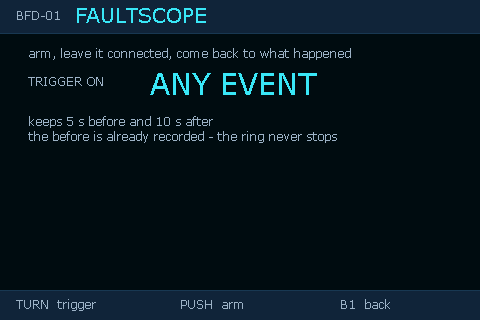
- FaultScope: live capture of a signal over time, with pre-trigger history so the moment before a fault is kept
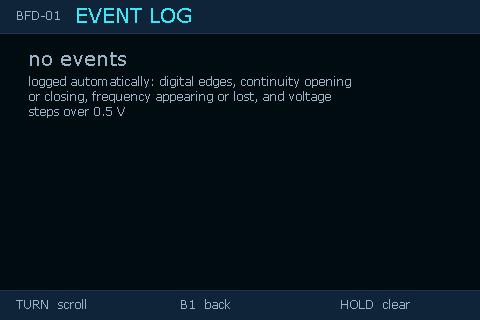
- Event log of state changes with timestamps
- Built-in Wi-Fi access point with a browser interface for the same data
- Firmware and application updates over USB through the BORGAS Device Manager, using the matching published release
A closer look
On the instrument.
Example interface screens. Screen content illustrates the interface; it is not a live measurement.
Before you choose
Compatibility & details.
- BORGAS Device Manager on Windows for updates, backup and restore
The Rev A 100 VDC configuration was bench tested. This is not a CAT safety certification or an AC/mains rating. Confirm the hardware revision and applicable operating limits before use.
| Feature | Details |
|---|---|
| Display | 480 × 320 colour LCD, five colour themes |
| Voltage input | DC, 100 V design range |
| Resistance / continuity | Single channel, audible continuity |
| Connectivity | USB; Wi-Fi access point with web interface |
| Controls | Rotary encoder and two buttons |
| Controller | ESP32 |
| Hardware revision | Rev A |
Next step
Make it fit your setup.
Ask about BFD-01, configuration or product support.